Essential tools for small business success define how you operate, grow, and compete in 2026. You need the right software stack to handle finances, manage customers, and keep your team aligned. This guide breaks down the exact applications you should use to build a profitable, scalable company this year.
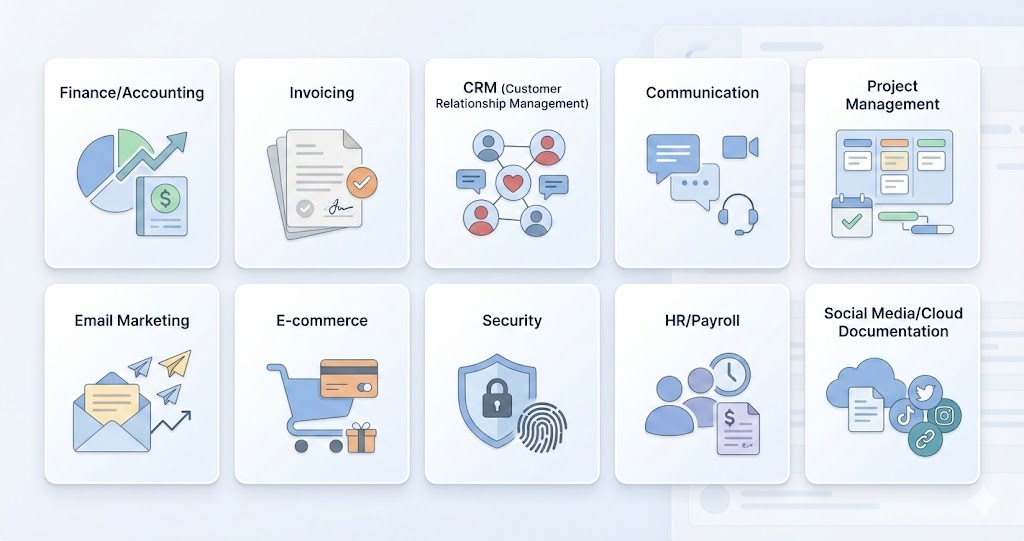
The Top 10 Tools at a Glance
Before we break down the details, here is the quick list of software discussed in this guide:
- QuickBooks Online (Finance)
- Invoice Simple (Invoicing)
- HubSpot CRM (Customer Relations)
- Slack (Communication)
- Trello (Project Management)
- Mailchimp (Marketing)
- Shopify (E-Commerce)
- LastPass (Security)
- Gusto (HR & Payroll)
- Hootsuite (Social Media)
Bonus: Google Workspace (Documentation)
Why are financial management tools critical for your growth?
Running a profitable company starts with tracking every dollar that enters and leaves your bank account.
To secure your financial health, you must use software that automates expense tracking, simplifies tax compliance, and generates clear profit and loss statements. Without these systems, you risk cash flow gaps that can stall your operations.
1. QuickBooks Online: The Standard for Accounting
You need a financial command center. QuickBooks Online connects directly to your business bank accounts to categorize expenses automatically, making it the industry standard for small business accounting.
Why it wins for 2026: In the financial world, data accuracy is king. QuickBooks Online has refined its “Live” features, allowing you to collaborate with bookkeepers in real-time. Unlike competitors such as Xero, which is fantastic but sometimes lags in US-bank integration speeds, QuickBooks offers near-instant transaction updates.
How it helps you scale: As your business grows, your tax complexity increases. QuickBooks automatically tags potential tax deductions, saving you thousands at the end of the year. Its reporting suite generates Profit & Loss statements and Balance Sheets with a single click; documents you will inevitably need when applying for loans or seeking investors. You can stop guessing about your cash flow and start making decisions based on hard data.
Accurate financials aren’t just for planning; they’re what lenders expect. With your books in order, compare the best small business loan options for 2026 and apply for a business loan through a single application that can match you to multiple lenders and products.
2. Invoice Simple: How can you get paid faster?
Getting paid shouldn’t be a project. Invoice Simple Invoice Generator is designed for the mobile-first entrepreneur who needs to send an estimate or invoice the moment a job is finished, right from the parking lot.
Why it wins for 2026: While comprehensive suites like FreshBooks are powerful, they can feel bloated if you just want to bill a client. Invoice Simple focuses entirely on speed. You can turn an estimate into an invoice in seconds. In 2026, clients expect digital friction to be zero; if they can’t pay you on their phone in one tap, you move to the bottom of their payment pile.
How it helps you scale: Manual invoicing via Word or Excel is a recipe for errors and lost revenue. By using a dedicated generator, you look professional instantly. You can track exactly when a client views an invoice, removing the “I never got the email” excuse. This transparency accelerates your cash flow cycle, ensuring you have the funds to reinvest in your operations.
How does a CRM improve your customer retention?
A Customer Relationship Management (CRM) system centralized your data so you can treat every client like they are your only one.
Stopping leads from falling through the cracks is the primary job of a CRM. It records every email, call, and meeting, giving your sales team the context they need to close deals and keep existing customers happy.
3. HubSpot CRM: Scaling Your Relationships
HubSpot CRM is your source of truth for every customer interaction. It tracks emails, calls, and meetings automatically, preventing leads from slipping through the cracks.
Why it wins for 2026: The “Freemium” model of HubSpot remains unbeatable. Unlike Salesforce, which requires a steep learning curve and high setup costs, HubSpot allows you to start immediately for free. You can manage your sales pipeline visually, dragging deals from “Lead” to “Won” as they progress.
How it helps you scale: You cannot remember the details of 50 different prospects. HubSpot records everything. When you are running high-traffic campaigns—perhaps leveraging seasonal tips from HubSpot guides, you need a system that segments your audience. This allows you to send hyper-personalized messages to VIP clients while nurturing colder leads with automated sequences, maximizing your revenue per lead.
What is the best way to handle team communication?
Centralizing your team’s conversations in one searchable platform reduces email clutter and speeds up decision-making.
Relying solely on email chains leads to lost information and slow response times. You need a dedicated messaging app that organizes discussions by topic, project, or department to keep everyone on the same page.
4. Slack: connecting your remote and hybrid teams
Slack is your digital headquarters. It organizes conversations into “Channels” (by project, topic, or team), drastically reducing internal email clutter and speeding up decision-making.
Why it wins for 2026: While Microsoft Teams is a strong contender for those deeply embedded in the Office 365 ecosystem, Slack wins on usability and integrations. It connects effortlessly with almost every other tool on this list (like Trello and Google Drive). In 2026, the “Huddle” feature—a quick, audio-only chat—replicates the casual desk drive-by, essential for hybrid teams.
How it helps you scale: Email is where information goes to die. Slack makes knowledge searchable. When you hire a new employee, they can read through the project channel history and get up to speed in hours, not weeks. If you are struggling to bridge the gap between external client emails and internal chatter, looking into Apple Mail extensions can help you route client updates directly into your Slack workflow.
How do you keep projects on track and meet deadlines?
Visualizing your workflow with boards and cards ensures every team member knows their tasks and deadlines.
Project management software prevents confusion about who is doing what. By making responsibilities transparent, you hold your team accountable and spot bottlenecks before they delay your delivery.
5. Trello: Visual Management for complex tasks
Trello uses a Kanban-style board (To Do, Doing, Done) to visualize your projects. It is incredibly intuitive, allowing you to see the status of every task at a glance without reading through complex status reports.
Why it wins for 2026: Complexity is the enemy of execution. Tools like Asana or Monday.com are powerful but often require a dedicated project manager to maintain. Trello’s visual simplicity means your team will actually use it. You can create cards for tasks, attach files, set due dates, and tag owners effortlessly.
How it helps you scale: You need accountability. With Trello, you know exactly who is working on what. It prevents bottlenecks because you can visually see if one column (e.g., “In Review”) is overloaded. If you need to boost your team’s output further, exploring additional productivity apps can help you find time-tracking or focus tools that integrate right into your Trello boards.
Why is email marketing still essential in 2026?
Email marketing remains the highest ROI channel because you own the audience and can communicate directly without algorithm interference.
Social media reach fluctuates, but your email list is a stable asset. You need a tool that automates these communications, sending the right message to the right person at the exact right time.
6. Mailchimp: Automating your outreach
Mailchimp is the engine behind your email marketing. It allows you to design professional newsletters, manage your subscriber lists, and automate email sequences to nurture leads 24/7.
Why it wins for 2026: You own your email list; you rent your social media followers. Mailchimp’s automation builder is sophisticated yet accessible. You can set up “Drip Campaigns” that automatically welcome new subscribers, educate them about your product, and upsell them over time. Compared to Constant Contact, Mailchimp offers better design flexibility and analytics at the entry level.
How it helps you scale: Analytics drive growth. Mailchimp tells you exactly who opened your email and what links they clicked. This data is gold. It helps you understand what your audience wants so you can refine your offers. If you are just establishing your business identity, you might be researching web-based email providers to get started, but remember that a professional email marketing tool is distinct from your daily inbox—it is a revenue generator.
Which platform powers the best online stores?
A robust e-commerce platform manages your inventory, payments, and shipping in one integrated system.
You cannot afford to stitch together disparate tools when selling online. You need a unified solution that handles the technical heavy lifting so you can focus on product development and customer service.
7. Shopify: The Engine of Modern Retail
Shopify is the world’s leading e-commerce platform. It handles everything from your online storefront design to payment processing and inventory management, all in one secure cloud-based system.
Why it wins for 2026: Unless you are a developer, you should avoid self-hosted solutions like WooCommerce. They require you to manage security updates and server maintenance. Shopify handles the technical heavy lifting for you. In 2026, their “Shop Pay” checkout is one of the fastest on the web, significantly reducing cart abandonment rates.
How it helps you scale: Shopify grows with you. You can start with one product and scale to thousands without changing platforms. Its massive app store allows you to plug in loyalty programs, reviews, and dropshipping integrations instantly. It unifies your sales channels, letting you sell on Instagram, TikTok, and your website from a single inventory source.
How do you secure your business passwords?
Using a password manager eliminates the risk of weak passwords and allows safe credential sharing among staff.
Cybersecurity is not optional. A single breach can destroy your reputation. You need a tool that generates complex, unique passwords for every account and stores them in an encrypted vault.
8. LastPass: protecting your digital assets
LastPass is a password manager that generates and stores complex, unique passwords for every account you own. It allows you to share access with employees securely without revealing the actual login credentials.
Why it wins for 2026: Security breaches destroy small businesses. You cannot rely on “Password123” or using the same password for your bank and your social media. LastPass encrypts your vault so only you can access it. While 1Password is a strong rival with a slightly more modern interface, LastPass often provides a more cost-effective entry point for small teams needing basic sharing features.
How it helps you scale: As you hire, you need to give employees access to tools like Instagram or your vendor portals. LastPass allows you to share these credentials securely. When an employee leaves, you simply revoke access—you don’t have to scramble to change 50 different passwords manually. This operational security is non-negotiable for a mature business.
What is the most efficient way to manage HR and payroll?
Cloud-based HR platforms automate tax filings, benefits enrollment, and payroll runs, reducing administrative overhead.
Mistakes in payroll or tax compliance can lead to severe penalties. You need software that handles the math and the legal requirements automatically, ensuring your team gets paid correctly and on time.
9. Gusto: simplifying people operations
Gusto makes payroll, benefits, and HR compliance easy. It is designed specifically for modern small businesses, automating the complex tax filings and calculations that usually require a dedicated specialist.
Why it wins for 2026: Legacy providers like ADP can be opaque with pricing and difficult to navigate. Gusto is transparent and incredibly user-friendly. It handles federal, state, and local payroll taxes automatically. If you make a mistake, their support team is generally responsive and helpful.
How it helps you scale: Hiring is hard; onboarding should be easy. Gusto allows new hires to enter their own bank details and tax info online, saving you paperwork. It also enables you to offer “big company” benefits like health insurance and 401(k)s, which are essential for attracting top talent in a competitive 2026 job market.
How can you manage multiple social media channels efficiently?
Social media management tools allow you to schedule content in advance and monitor all your feeds from a single dashboard.
Posting natively to five different platforms is a waste of time. You need a tool that lets you create content once and distribute it everywhere, while also tracking how your audience engages with it.
10. Hootsuite: controlling your brand narrative
Hootsuite is a dashboard that lets you manage all your social media profiles (Facebook, Instagram, LinkedIn, X, etc.) from one place. You can schedule posts in advance and monitor what people are saying about your brand.
Why it wins for 2026: Consistency is the key to social growth. Hootsuite allows you to sit down once a week, schedule all your content, and then walk away. While Buffer is a great alternative for simple scheduling, Hootsuite offers deeper “social listening” tools. This lets you track specific keywords or hashtags, giving you real-time insight into market trends.
How it helps you scale: You cannot be on your phone 24/7. Hootsuite’s analytics show you the best times to post for maximum engagement. By automating the distribution of your content, you free up time to focus on creating high-quality posts rather than just hitting “publish” every day.
Why is cloud-based document management necessary?
Cloud document tools allow real-time collaboration, version control, and access to your files from any device.
The days of emailing attachments back and forth are over. You need a live environment where multiple people can work on a spreadsheet or proposal simultaneously without creating conflicting versions.
Bonus: Google Workspace: Collaborating in Real-Time
Google Workspace (formerly G Suite) is the cloud-based productivity suite that powers modern collaboration. It includes Gmail, Docs, Drive, Sheets, and Meet.
Why it wins for 2026: Real-time collaboration is the standard. You need to work on the same financial model or proposal as your partner simultaneously, without emailing versions back and forth. Google Workspace makes this seamless.
How it helps you scale: Professionalism matters. Using a custom domain ([email protected]) via Google Workspace builds immediate trust compared to a generic @gmail.com address. If you are setting this up, ensure you choose a professional email address format that will last as you grow. If you are still brainstorming, looking at email address ideas can help you establish a naming convention that scales with your team.
Final Thoughts on Your Tool Stack
Selecting the essential tools for small business success is about more than just buying software. It is about choosing platforms that talk to each other and grow with you.
Start with the basics: secure your finances with QuickBooks and Invoice Simple. Then, stabilize your operations with Slack and Trello. Once your foundation is solid, layer on growth tools like HubSpot and Mailchimp.
Do not try to implement everything at once. Pick the one area causing you the most pain right now—whether that is missed invoices or chaotic communication—and solve that first.
(FAQ)
What is the best free software for small business in 2026?
The best free software options include HubSpot CRM for customer management, Slack (free tier) for team communication, Trello for project management, and Google Workspace (personal version) or Zoom for meetings. However, as you scale, you will likely need to upgrade to paid versions for advanced features.
How much should a small business spend on software per month?
Most small businesses spend between $150 and $500 per month on their essential tech stack. This typically includes accounting ($30-$80), email marketing ($20-$50), project management ($10-$30/user), and website hosting/e-commerce platforms ($30-$300).
Is QuickBooks Online better than Xero for small business?
For US-based businesses, QuickBooks Online is generally preferred due to better bank integration and wider acceptance by tax professionals. However, Xero is a fantastic alternative for businesses that need unlimited users on a lower-tier plan or those based outside the US where Xero’s banking feeds are stronger.
Do I really need a CRM if I have a small client list?
Yes. Implementing a CRM like HubSpot early allows you to build organized habits. If you wait until you have 100 clients to start using a CRM, the data migration will be painful. Starting early keeps your data clean and scalable from day one.


