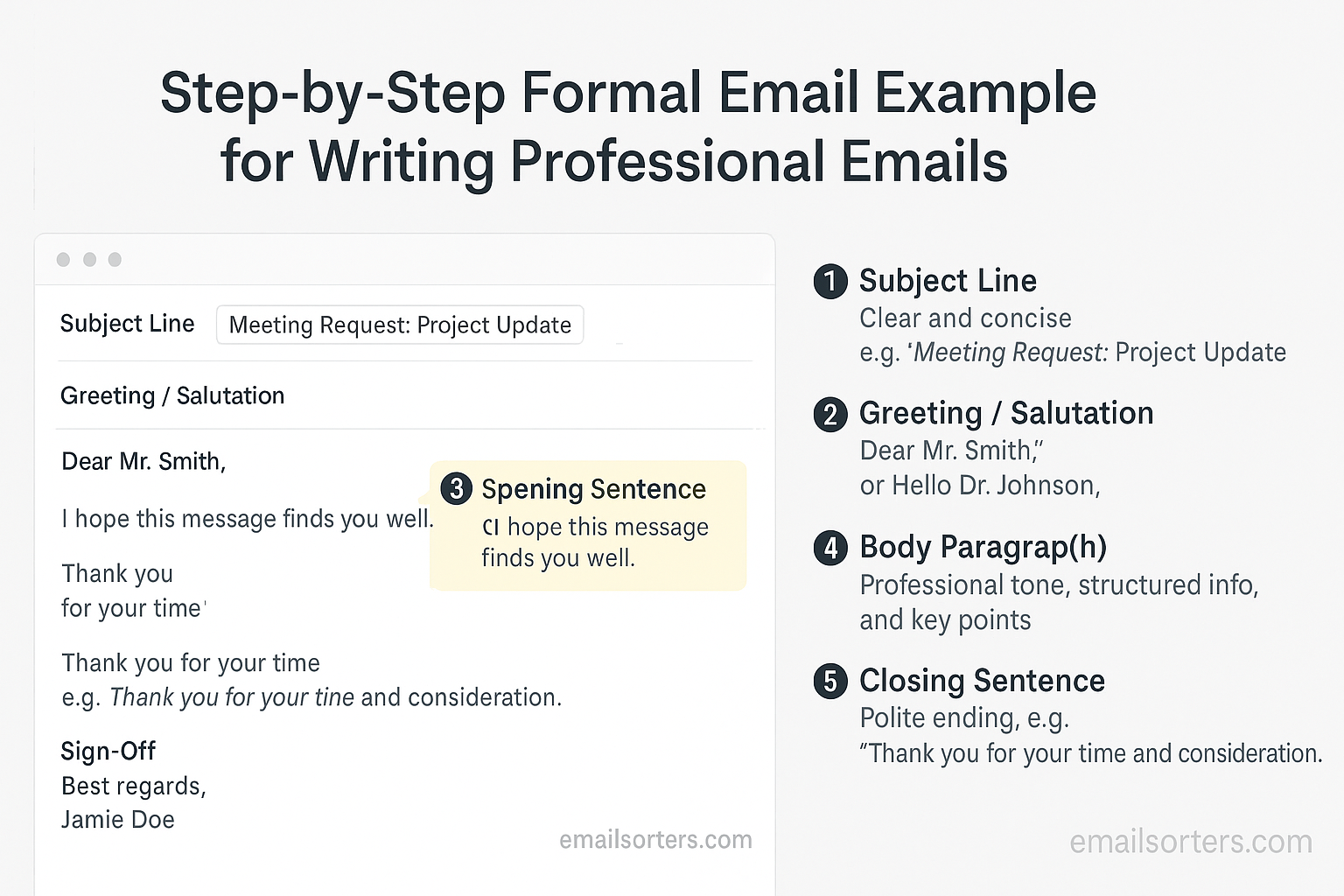
A formal email is more than just a message, it’s a reflection of your professionalism, clarity, and respect for the recipient. Whether you’re applying for a job, reaching out to a client, or communicating with a supervisor, the way you structure and write your email can determine the impression you leave. Many people underestimate how much tone and structure matter, but in today’s professional world, a well-crafted formal email can open doors while a poorly written one can close them.
This guide breaks down every part of a formal email, explains why each section matters, and provides practical examples you can adapt for your own use.
Why Writing a Formal Email Matters
Emails are often the first point of contact in professional settings. A formal approach sets the right tone and ensures you’re taken seriously.
Establishing Professional Credibility
When you write a clear, well-structured email, you show that you value both your time and the recipient’s. It demonstrates that you’re organized, thoughtful, and professional. These qualities build credibility and trust, especially with new contacts.
Making a Strong First Impression
In many cases, your email is the first interaction someone will have with you. A polished message helps you stand out from dozens of casual or poorly written emails. First impressions can influence hiring decisions, client trust, and workplace relationships.
Ensuring Clarity and Respect
Formal emails reduce the chance of miscommunication. By using precise wording and a respectful tone, you ensure your message is understood and appreciated. In workplaces where efficiency and respect are highly valued, this makes a real difference.
Understanding the Structure of a Formal Email
A strong formal email follows a clear structure that makes it easy to read and understand. Each part serves a specific purpose, from getting the recipient’s attention to leaving a professional final impression.
Subject Line
The subject line should give a snapshot of the email’s purpose. It sets expectations and helps the recipient decide whether to open it immediately.
Greeting
Your greeting introduces the message and sets the tone. Choosing the right formality level is crucial to starting on the right note.
Introduction
The introduction briefly explains who you are and why you’re writing. It should create relevance without being overly detailed.
Body
The body delivers the main content. Organizing it clearly helps the recipient absorb the key points quickly.
Closing and Signature
The closing summarizes the purpose or next steps, while the email signature provides professional contact information for follow-up.
Crafting a Clear Subject Line
The subject line often determines whether your email gets opened right away or left unread.
Keeping It Short and Informative
Aim for six to eight words that capture the essence of your message. For example, instead of “Regarding Our Previous Discussion About the New Marketing Campaign and Budget Allocations,” write “Follow-Up: Marketing Campaign Budget Discussion.”
Avoiding Spam-Like Words
Words like “urgent,” “free,” or excessive punctuation can trigger spam filters or make your email seem unprofessional. Keep the tone straightforward.
Using Keywords to Reflect the Email’s Purpose
If you’re requesting a meeting, use “Meeting Request.” If you’re applying for a role, use “Application for Marketing Associate Position.” This clarity makes it easy for the recipient to understand your purpose immediately.
Writing a Professional Greeting
Your greeting sets the tone for the entire email, so choose it carefully.
Choosing Formal or Semi-Formal Styles
For job applications, client communication, or emails to senior staff, a formal greeting such as “Dear Mr. Johnson” or “Dear Dr. Patel” is best. For colleagues you know well, “Hello Sarah” or “Hi James” may be acceptable.
Using Correct Titles and Names
Always double-check the spelling of names and use the correct title when appropriate. A small mistake here can damage your credibility before the recipient even reads the main message.
Handling Unknown Recipients
If you don’t know the recipient’s name, use a professional fallback such as “Dear Hiring Manager” or “Dear Customer Support Team.” Avoid generic greetings like “To whom it may concern,” which can feel outdated and impersonal.
Starting with a Polite Introduction
The introduction is your chance to create context quickly.
Stating Who You Are
If the recipient doesn’t know you, introduce yourself briefly. For example: “My name is Laura Kim, and I am applying for the Project Manager position at BrightEdge Consulting.”
Explaining Why You’re Writing
State your purpose clearly. Instead of writing, “I wanted to reach out,” say, “I am writing to confirm our meeting on May 10.”
Creating Immediate Relevance
Make sure the recipient understands why your email matters to them. For example: “Following up on our conversation during last week’s sales conference, I’d like to schedule a time to discuss partnership opportunities.”
Writing the Main Body of a Formal Email
The body of a formal email is where you communicate your main message. A professional body is clear, concise, and structured so the recipient can quickly grasp your point. Start by organizing your content into logical sections. If you’re sharing multiple updates or discussing several topics, address the most important one first to ensure it gets attention.
Use concise and professional language. Avoid overly casual expressions or filler words that dilute your message. Instead of saying, “Just wanted to quickly touch base,” you could write, “I am reaching out to follow up on our discussion.” The difference may seem small, but it signals a higher level of professionalism.
Highlight key information early. If your email is about a deadline, mention the date in the first or second sentence. Don’t bury important details at the end, as the recipient might skim and miss them. Keeping the structure simple and direct ensures your message is easy to follow.
Writing a Strong Closing Statement
A good closing does more than signal the end of your email—it reinforces your purpose and guides the recipient on the next step. Restating the purpose can help make sure there is no confusion. For example, “I look forward to your feedback on the proposal by Friday.” This reminds the recipient of your request and provides a clear timeline.
Expressing gratitude politely is another important element. Thanking the recipient for their time, attention, or assistance adds a respectful tone to your closing. For instance, “Thank you for considering my application” or “I appreciate your time and support on this project.”
Encouraging a response ensures that the conversation continues. A sentence like “Please let me know if the proposed time works for you” provides a clear invitation for the recipient to reply. Together, these elements make your closing both professional and effective.
Choosing the Right Sign-Off
The sign-off phrase bridges the body of your email and your signature. Selecting the right one depends on the context. Formal options such as “Sincerely,” “Kind regards,” or “Best regards” are appropriate for job applications, client communication, or any situation where professionalism is essential.
For more routine workplace communication, neutral options like “Best,” “Thanks,” or “Regards” are often suitable. They keep the tone polite without being overly formal.
Avoid casual sign-offs such as “Cheers,” “Talk soon,” or “Later,” unless you know the recipient well and the context allows informality. In professional settings, these closings may come across as careless or overly casual. Choosing the right sign-off helps maintain the professional tone you’ve set throughout the email.
Designing a Professional Email Signature
A clean, professional email signature acts as a digital business card. It should include your key contact information while keeping the design simple. At a minimum, include your full name, job title, company name, and a reliable contact method such as a phone number or email address.
Adding social media links can be valuable if they are professional. A link to your LinkedIn profile or company Twitter account provides an easy way for recipients to learn more about you or your organization. Use small icons rather than long links to keep the signature tidy.
The design should remain minimal. Avoid using multiple colors, large images, or inspirational quotes. Too much decoration can make your signature distracting or difficult to read. A simple, well-structured signature ensures that the recipient can quickly find the information they need.
Example of a Complete Formal Email
To bring all these elements together, let’s look at a formal email example:
Subject: Application for Marketing Specialist Position
Dear Ms. Thompson,
My name is Daniel Reyes, and I am writing to apply for the Marketing Specialist position at Horizon Media. With three years of experience in digital marketing and a proven record of increasing engagement rates by 30%, I believe I would be a strong fit for your team.
Attached, please find my résumé and cover letter. I would greatly appreciate the opportunity to discuss how my skills and experience align with Horizon Media’s goals. Please let me know if you require any additional information.
Thank you for your time and consideration. I look forward to your response.
Sincerely,
Daniel Reyes
Marketing Coordinator
Horizon Media
(555) 123-4567
linkedin.com/in/danielreyes
Common Mistakes to Avoid in Formal Emails
Even with good intentions, it’s easy to make mistakes that weaken the professionalism of your email. One of the most common is using overly casual language. Phrases like “Hey there” or “Just checking in real quick” may work in casual messages but come across as unprofessional in formal communication. Replacing them with “Dear Mr. Adams” or “I am writing to follow up” instantly improves the tone.
Another mistake is forgetting attachments or important details. Nothing frustrates a recipient more than receiving a message that says “Please see attached” with no file included. Always double-check before clicking send. Similarly, leaving out critical information like dates, deadlines, or contact details can create confusion and unnecessary follow-ups.
A third frequent issue is writing long, unstructured paragraphs. Large blocks of text are difficult to read, and busy professionals may skim or ignore them. Breaking content into short, focused sections helps ensure your message is understood quickly and clearly.
Tools That Help Improve Formal Emails
You don’t have to rely on your own proofreading skills alone. Many digital tools can help you craft polished, error-free emails. Grammar and spell check tools such as Grammarly or Microsoft Editor flag typos, grammar issues, and even tone concerns. These are especially helpful for non-native speakers or when you’re drafting in a hurry.
Email template builders can save time while maintaining professionalism. Platforms like HubSpot or Mailchimp offer customizable templates that ensure consistent branding and structure. Even if you’re writing from scratch, having a standard format helps keep your messages professional.
Scheduling and tracking features in tools like Boomerang or Yesware can also improve your email strategy. They let you send emails at optimal times and track whether the recipient has opened your message. This is especially useful when following up on job applications or client proposals.
Reviewing Your Email Before Sending
The final step before hitting send is reviewing your email carefully. Checking tone and clarity ensures your message is both professional and easy to understand. Reading your email aloud can help you spot awkward phrasing or overly long sentences.
Always confirm that all links and attachments work correctly. Broken links or missing files can damage your credibility and frustrate the recipient. If you promised a document, double-check that it’s included.
Finally, verify names and titles. Misspelling the recipient’s name or using the wrong title is a small mistake that can make a big negative impact. Taking a few extra seconds to confirm these details shows respect and attention to detail.
Conclusion
Writing a formal email is about more than putting words on a screen—it’s about presenting yourself in a way that earns respect and encourages a positive response. Every part of the email, from the subject line to the signature, contributes to the impression you leave. By keeping your message clear, polite, and structured, you show professionalism and attention to detail.
The process may feel detailed at first, but once you practice, it becomes second nature. Crafting a strong subject line, addressing the recipient respectfully, writing a concise body, and closing with a professional sign-off are habits that will serve you well in any workplace. Think of each formal email as a handshake: brief, confident, and respectful, leaving the recipient with a clear sense of your professionalism.
FAQs
How long should a formal email be?
A formal email should typically be between 100 and 250 words. Long enough to include necessary details, but short enough to respect the recipient’s time.
What’s the safest sign-off to use?
“Best regards,” “Sincerely,” and “Kind regards” are safe, professional choices suitable for almost any context.
Should I always include my phone number in the signature?
Yes, including a phone number is a good practice. It gives recipients another way to contact you if email isn’t convenient.
Is it okay to use bullet points in formal emails?
Yes, when presenting multiple items such as meeting agendas or lists of updates, bullet points can improve readability. Keep the formatting simple and professional.
How quickly should I reply to a formal email?
Responding within 24 to 48 hours is considered professional. If you need more time, send a short acknowledgment to let the recipient know you received their message.


