First impressions matter, and in professional settings, many of those impressions are now made through email. Whether you’re joining a new team, networking after an event, or reaching out to a potential client, a well-crafted introduce yourself email sets the tone for your relationship. Writing one requires more than just saying your name, it’s about being clear, professional, and respectful of the recipient’s time.
In this guide, you’ll learn how to write effective introduction emails, step by step, with examples and templates tailored for different situations.
Why Introduce Yourself Emails Matter in 2025
With remote and hybrid work now standard across industries, introducing yourself via email has become more important than ever. It’s often the first impression people will have of you, and how you write it can determine whether your relationship starts strong.
Making Strong First Impressions Online
In face-to-face settings, a handshake and smile set the tone. Online, your introduction email plays that role. A polished message shows professionalism and reliability right from the start.
Building Connections in Remote and Hybrid Workplaces
Teams spread across different locations often don’t meet in person. An introduction email helps bridge that gap, making you more approachable and establishing your presence within the group.
Standing Out in Crowded Inboxes
Most professionals receive dozens of emails daily. A clear, respectful introduction helps your message get noticed and increases the likelihood of a timely response.
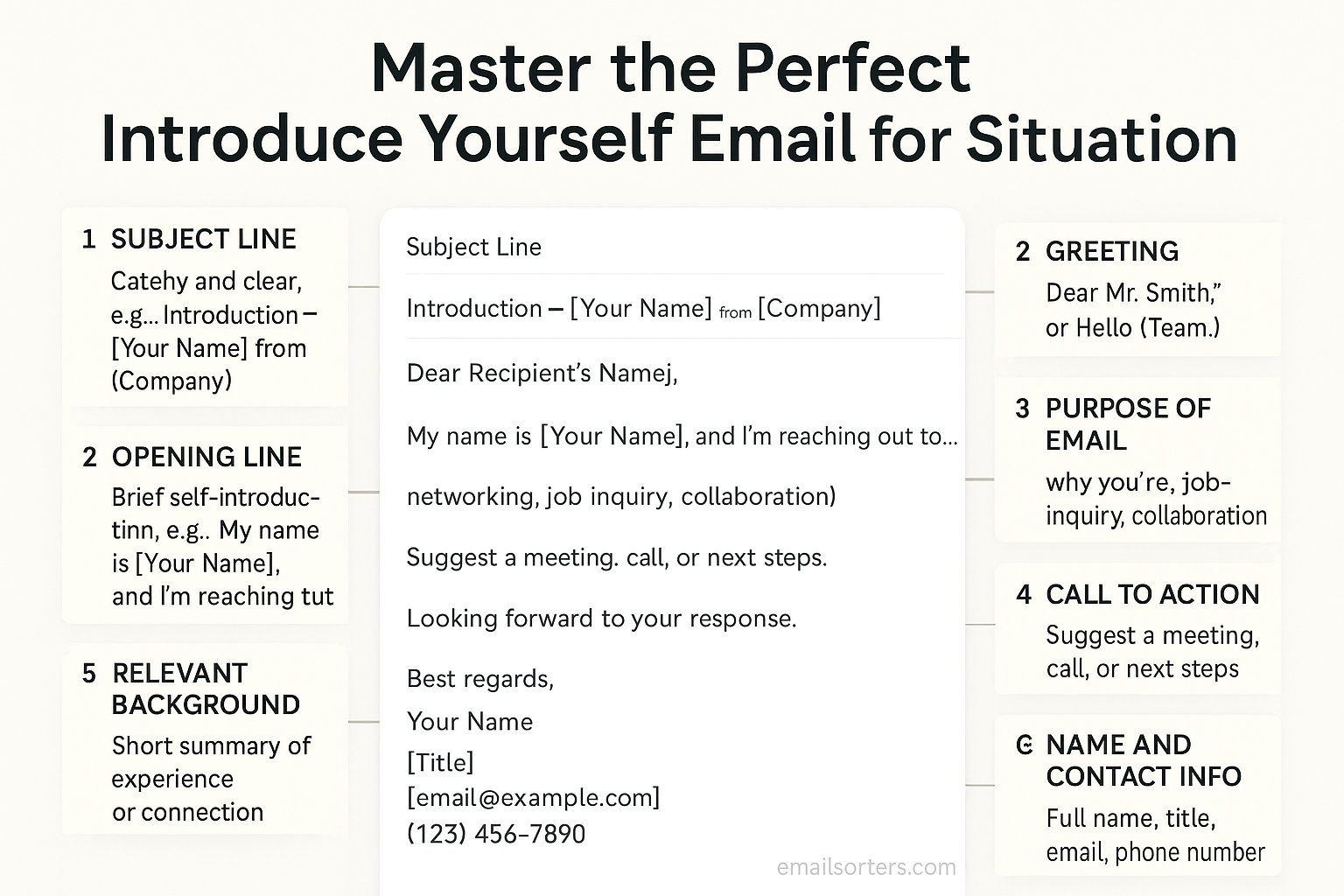
Key Elements of an Effective Introduce Yourself Email
Every effective introduction email has a few essential components. Leaving out any of these can weaken your message.
A Clear and Direct Subject Line
Your subject line should immediately convey your purpose. Examples include:
- “Introduction: New Marketing Manager at BrightEdge”
- “Following Up: Conversation from Tech Summit 2025”
Personalized Greeting
Addressing the recipient by name shows respect and attention to detail. Always double-check spelling, as errors here can harm your credibility.
Concise Self-Introduction
Briefly state who you are and, if relevant, your role or background. For example: “My name is Priya Desai, and I recently joined the finance team at Global Tech as an analyst.”
Stating Your Purpose Clearly
Explain why you’re reaching out. Whether it’s to connect after an event, start a work relationship, or request a meeting, clarity prevents confusion.
Professional Closing and Signature
Finish with a polite closing such as “Best regards” or “Kind regards,” followed by a professional signature that includes your name, title, and contact information.
Writing Style That Works Best for Introductions
The way you write your email is just as important as what you say. Tone and style shape how your message is received.
Balancing Professionalism with Warmth
Your goal is to come across as approachable yet professional. For example, “It’s a pleasure to join your team and I look forward to working with you” strikes the right balance.
Using Simple, Direct Language
Avoid complex sentences and unnecessary jargon. A straightforward style ensures the recipient understands your message quickly.
Avoiding Overly Formal or Casual Tone
Too formal can feel stiff, while too casual risks sounding unprofessional. Aim for a respectful, neutral tone that fits the situation.
Common Situations for Introduce Yourself Emails
Not all introductions are the same. Tailoring your message to the situation increases its effectiveness.
Introducing Yourself to a New Team
When joining a new team, focus on building rapport: “I’m excited to join as the new project manager and look forward to collaborating with you.”
Networking After a Conference or Event
After meeting someone at a professional event, follow up quickly: “It was great speaking with you at the Global Tech Summit. I’d like to stay connected and continue our conversation about digital marketing trends.”
Reaching Out to a Potential Client
When writing to a client, highlight the value you bring: “I’d love to schedule a time to show how our solutions can help streamline your reporting process.”
Contacting a Recruiter or Hiring Manager
When reaching out about a role, be clear and concise: “I’m reaching out to express my interest in the Data Analyst position you posted. I believe my background in predictive analytics aligns well with the role.”
Cold Outreach to Industry Professionals
If you’re introducing yourself without a prior connection, be respectful of their time: “I admire your work in renewable energy policy and would appreciate the opportunity to connect and learn more about your career path.”
Step-by-Step Example of a Strong Introduction Email
A strong introduction email combines all the elements into a short, professional, and engaging message.
Subject Line Example
“Introduction: New Account Manager at Orion Solutions”
Greeting Example
“Dear Ms. Carter,”
Introduction Paragraph Example
“My name is Samuel Lee, and I’ve recently joined Orion Solutions as an Account Manager in the client success department.”
Purpose Statement Example
“I’m reaching out to introduce myself and share that I’ll be your new point of contact for ongoing projects. I look forward to ensuring a smooth transition and supporting your goals.”
Closing Example
“Please don’t hesitate to reach out if you need any assistance. I look forward to working with you.
Best regards,
Samuel Lee
Account Manager, Orion Solutions
[email protected] | (555) 456-7890”
Mistakes to Avoid in Introduce Yourself Emails
Even a well-intentioned introduction email can fall flat if you make common mistakes. One frequent issue is writing overly long emails. If your introduction stretches beyond a few short paragraphs, the recipient may skim or skip it entirely. Keep your message focused on who you are, why you’re writing, and what you hope to achieve.
Another mistake is using generic or spammy subject lines. Lines like “Hello” or “Quick Question” don’t provide enough context and risk being ignored. A subject that clearly states your purpose—such as “Introduction: Marketing Analyst Joining Your Team”—is far more effective.
A third mistake is focusing too much on yourself. While the email is an introduction, it shouldn’t read like a résumé. Instead of only listing your achievements, connect your background to how you can add value to the recipient or the relationship. This shifts the tone from self-promotion to collaboration.
Tools That Can Help Write Better Introduction Emails
You don’t have to create introduction emails from scratch each time. Several tools can help make the process smoother and more effective. Grammar and spell check tools like Grammarly or Microsoft Editor ensure your writing is polished and error-free, which is critical for leaving a professional impression.
Email template libraries, often included in platforms like HubSpot or Mailchimp, provide pre-designed structures you can adapt. These templates save time while maintaining professionalism, especially when you need to send multiple introductions in a short period.
Scheduling tools such as Boomerang or Yesware allow you to send emails at the most effective times. For example, scheduling your introduction for early morning on a weekday increases the chances it will be seen promptly. These tools ensure your introductions don’t get buried in busy inboxes.
Examples of Introduce Yourself Email Templates
To give you a practical starting point, here are examples you can adapt depending on your situation.
Professional Networking Template
Subject: Great Connecting at the [Event Name]
Dear [Recipient Name],
It was a pleasure meeting you at [Event Name] yesterday. I enjoyed our discussion about [Topic] and would love to stay in touch. Please let me know if you’d be open to a follow-up conversation.
Best regards,
[Your Full Name]
[Your Role]
[Contact Information]
Client Introduction Template
Subject: Introduction – Your New Point of Contact at [Company Name]
Dear [Client Name],
My name is [Your Name], and I’ve recently joined [Company Name] as your new account manager. I look forward to supporting your projects and ensuring your needs are met seamlessly. Please don’t hesitate to reach out if you need assistance.
Kind regards,
[Your Full Name]
[Your Role]
[Contact Information]
Job Application Follow-Up Template
Subject: Introduction and Interest in [Job Title] Role
Dear [Hiring Manager’s Name],
My name is [Your Name], and I recently applied for the [Job Title] position at [Company Name]. I wanted to take a moment to introduce myself and share my enthusiasm for this opportunity. My background in [Field/Skill] aligns well with the requirements of the role, and I would welcome the chance to discuss it further.
Sincerely,
[Your Full Name]
[Contact Information]
Internal Team Introduction Template
Subject: Excited to Join the [Department Name] Team
Hi Team,
I’m [Your Name], and I’m excited to join the [Department Name] team as [Job Title]. I look forward to collaborating with each of you and contributing to our shared goals. Please feel free to reach out—I’d love to connect.
Best,
[Your Full Name]
Advanced Tips for Writing Introduction Emails
Once you’ve mastered the basics, you can take your introduction emails to the next level with a few advanced techniques. Adding a personal connection or shared interest makes your email more engaging. For example, mentioning a recent industry event you both attended creates common ground.
Keeping a clear call-to-action ensures your email leads somewhere. Instead of ending with a vague “Looking forward to connecting,” you might write, “Would you be available for a 15-minute call next week?” This gives the recipient a specific next step.
Finally, end on a positive and confident note. A closing such as “I’m excited about the opportunity to collaborate and share ideas” leaves the recipient with a warm impression and encourages a positive response.
Reviewing and Sending Your Email
Before hitting send, take a few moments to review your introduction email carefully. Proofreading for errors ensures that your message looks professional. Even small mistakes in spelling or grammar can distract from your message and weaken credibility.
Testing subject lines for clarity can also make a difference. If you’re unsure, ask yourself whether the recipient could guess the purpose of your email from the subject line alone.
Finally, ensure your email is mobile-friendly. Many professionals read emails on their phones, so use short paragraphs and a clean signature that displays well on small screens. This attention to detail helps your message stand out in any inbox.
Benefits of a Well-Written Introduction Email
A strong introduction email offers benefits that go beyond simply sharing your name and role. One of the most immediate advantages is faster response rates. When your email is clear, concise, and professional, recipients are more likely to reply promptly because they understand your purpose and see value in the interaction.
Another benefit is stronger professional relationships. First impressions set the tone for future communication, and a polished introduction email creates a foundation of trust and respect. This is especially important when reaching out to clients, supervisors, or industry professionals you haven’t met before.
Finally, a well-crafted introduction email supports your personal branding. Every email you send contributes to how people perceive you professionally. Writing thoughtful, professional introductions shows that you are organized, respectful, and serious about your work, which helps you stand out in competitive environments.
Cultural Considerations for Global Communication
In today’s global workplace, your introduction email may reach people from different cultural backgrounds. Adjusting formality to match the recipient’s region is crucial. For example, a highly formal greeting like “Dear Mr. Wang” may be expected in some Asian business contexts, while a slightly more casual “Hello Maria” might be perfectly acceptable in many Western workplaces.
Avoid using local slang or idioms that may not translate well. Expressions that seem normal in one culture can confuse or even alienate recipients in another. Clear, neutral language is the safest approach.
Time zones also play a role. If you know the recipient is in a different region, sending your email during their business hours shows consideration and increases the likelihood of a timely response. Thoughtful adjustments like these demonstrate cultural awareness and respect, which strengthen your professional image.
Handling No Response to an Introduction Email
Even the best introduction emails don’t always receive immediate replies. If you don’t hear back within a week, consider sending a polite follow-up. A simple line such as “Just checking in to see if you had a chance to review my previous email” is enough to remind the recipient without seeming pushy.
If a second follow-up also goes unanswered, it may be best to pause. Over-pursuing can appear unprofessional and may hurt your chances of building a positive relationship later.
Knowing when to stop following up is as important as sending the initial message. Sometimes, timing is the issue, and giving the recipient space may lead to better results when you try again in the future.
Conclusion
Mastering the introduce yourself email is one of the most valuable professional skills in 2025. Whether you are starting a new job, reaching out to a potential client, or networking after an event, your email sets the tone for the relationship that follows. A strong introduction is clear, concise, and respectful of the recipient’s time, while still showing warmth and professionalism.
By focusing on key elements—such as a direct subject line, a polite greeting, a concise introduction, and a professional closing—you ensure your email makes a positive impression. Adding personalization, considering cultural differences, and following up politely when needed further increases your chances of success.
Think of your introduction email as your digital handshake: firm, confident, and respectful. Done well, it not only opens the door to opportunities but also lays the foundation for lasting professional connections.
FAQs
How long should an introduction email be?
An introduction email should typically be 100–200 words. This length is long enough to share key details while keeping the message concise.
Should I always include a LinkedIn link in my signature?
Yes, if your LinkedIn profile is up-to-date and professional. It provides recipients with an easy way to learn more about you.
Is it okay to mention mutual contacts?
Absolutely. Mentioning a mutual contact adds credibility and often increases the chances of a positive response. Just be sure you have permission to use their name.
What’s the best time to send an introduction email?
Weekday mornings, between 8 AM and 10 AM local time for the recipient, tend to get the best open and response rates.
How soon should I follow up if there’s no response?
Wait about one week before sending a polite follow-up. If there’s still no reply after two attempts, it’s best to pause and try again later if appropriate.


