Most people spend a lot of time perfecting the subject line and main body of an email, but often rush through the closing. Yet the way you end your email can determine how the recipient remembers you. A polished closing not only reinforces professionalism but also increases the chance of a timely and positive response.
In this guide, you’ll learn why your email closing matters, how to structure it, and practical examples you can use in different contexts.
Why Your Email Closing Matters
Your closing is the last thing a recipient reads before deciding how to respond—or whether to respond at all.
The Final Impression Counts
Think of your email like a conversation. The closing is the handshake at the end—it leaves the recipient with a lasting memory. A strong closing creates confidence, while a sloppy or abrupt one can undo the effort you put into the rest of the email.
Closings Reflect Professionalism
An email that ends with “Thanks, John” looks much more professional than one that just stops without a sign-off. The small detail of a closing phrase and email signature signals attention to detail and respect for the recipient.
How Closings Influence Response Rates
Studies show that certain closing phrases like “Thanks in advance” increase response rates compared to neutral ones. While wording alone doesn’t guarantee a reply, a thoughtful closing improves your chances.
Key Elements of a Strong Email Closing
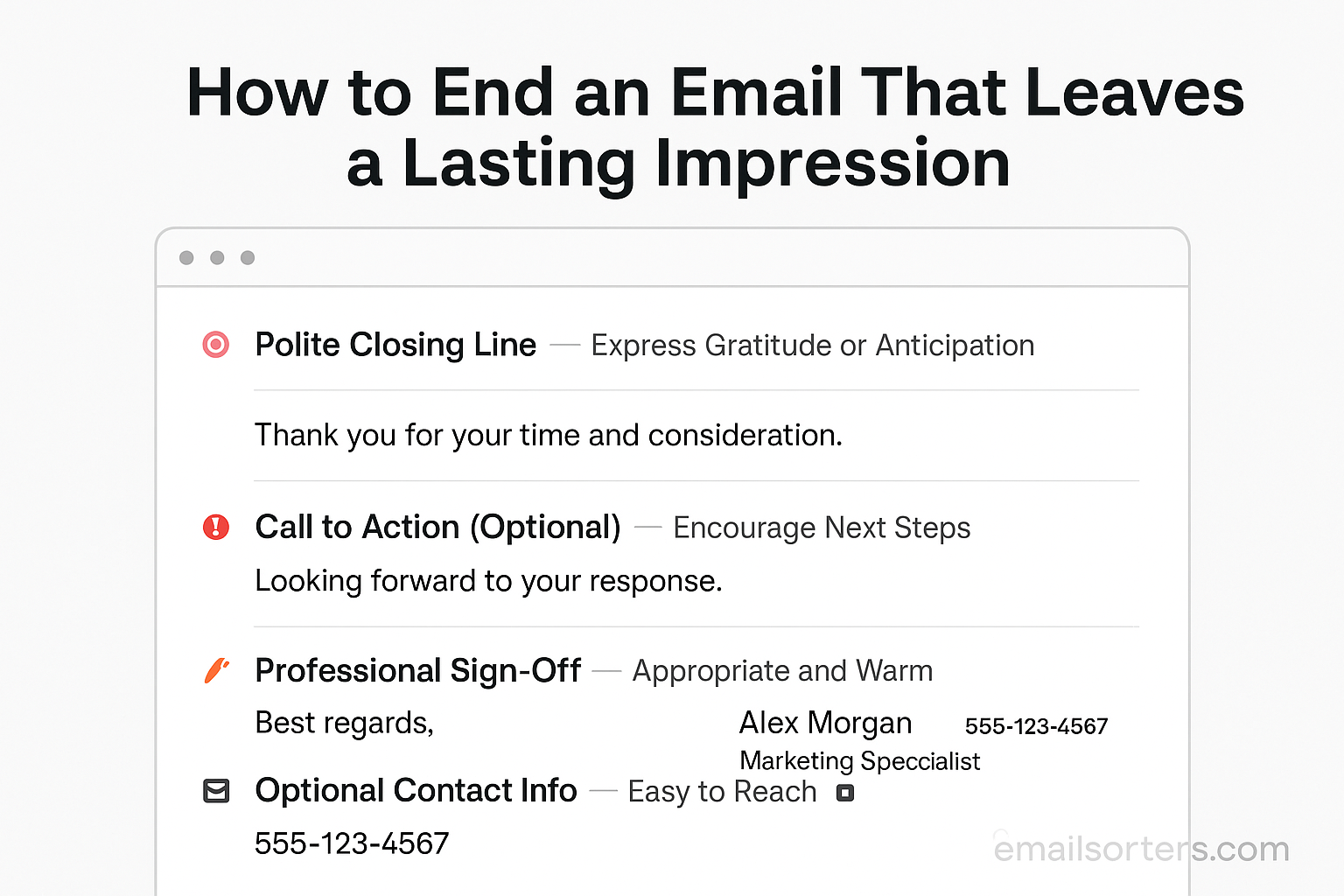
An effective closing has three main components: the final sentence, the sign-off phrase, and the signature.
A Clear Closing Line
Before your sign-off, add a closing sentence that wraps up the email. Examples:
- “I look forward to hearing your feedback.”
- “Please let me know if you need more details.”
- “Thanks again for your time and support.”
A Professional Sign-Off Phrase
The sign-off phrase bridges your message and your signature. Choose one that fits the tone of the email (we’ll cover options in the next section).
A Well-Designed Signature
Your signature should include your name, title, company, and contact information. A good signature ensures the recipient knows exactly who you are and how to reach you.
Choosing the Right Closing Line for Context
Not all closings fit every situation. Match your closing to the purpose and tone of your email.
Professional Closings for Business Emails
If you’re writing to a client, employer, or colleague about official matters, use closings that show respect and professionalism.
Examples:
- “I appreciate your attention to this matter.”
- “Looking forward to our discussion on Friday.”
Polite Closings for Customer Service
When handling customer inquiries, end with reassurance and support.
Examples:
- “Please don’t hesitate to reach out if you have more questions.”
- “We’re here to help anytime you need assistance.”
Warm Closings for Networking Emails
If you’re emailing after a conference or introduction, use a friendly yet professional tone.
Examples:
- “It was a pleasure connecting with you.”
- “Excited to stay in touch and share ideas.”
Popular Professional Sign-Off Phrases
The sign-off you choose shapes how the recipient interprets your message.
Formal Options (Best regards, Sincerely, Kind regards)
Use these when writing to potential employers, new clients, or senior executives:
- “Best regards,”
- “Sincerely,”
- “Kind regards,”
Neutral Options (Best, Thanks, Regards)
Good for most professional situations, especially with colleagues you already know:
- “Best,”
- “Thanks,”
- “Regards,”
Cautious Use of Informal Options (Talk soon, Cheers)
These are fine for friendly colleagues or informal professional settings, but avoid using them with clients or hiring managers unless you know their communication style:
- “Talk soon,”
- “Cheers,”
Crafting an Effective Email Signature
Your signature adds credibility and makes it easy for recipients to contact you.
Contact Information to Include
A simple, clear signature works best. Include:
- Full name
- Job title
- Company name
- Phone number
- Company website
Adding Social Media Links
If relevant, add a LinkedIn profile or a company Twitter account. Use small icons instead of long URLs for a cleaner look.
Balancing Design and Readability
Avoid cluttering your signature with images, quotes, or multiple colors. Stick to one font and two colors at most. The design should be professional, not distracting.
Mistakes to Avoid in Email Closings
One of the quickest ways to weaken an otherwise strong email is to end it poorly. A sloppy or careless closing can undo the professionalism of everything that came before. One common mistake is being overly casual. Ending a business email with phrases like “See ya” or “Later” gives the impression you are not taking the conversation seriously. In professional contexts, this can damage credibility and reduce the likelihood of receiving a thoughtful response.
Another mistake is adding unnecessary elements such as quotes, emojis, or personal catchphrases. While these may feel expressive, they often clutter the closing and may not translate well in professional environments. For example, inserting a long inspirational quote at the bottom of every email can make you appear less concise and distract from your actual message.
A third mistake is making the email signature excessively long. If your signature includes too many links, logos, or graphics, it may overwhelm the recipient. A neat, focused signature communicates professionalism far more effectively than one that tries to include every possible detail.
Email Closings for Different Professional Scenarios
The best way to end an email often depends on the situation. For job applications and interviews, a formal tone works best. Ending with “Sincerely” or “Kind regards” and including a clean signature with your contact information shows respect for the process. A closing line such as “I look forward to the opportunity to discuss my application further” helps keep the tone both professional and optimistic.
When writing to a client or prospect, you should show confidence and courtesy. A closing line such as “I look forward to hearing your thoughts on the proposal” demonstrates initiative while leaving space for the recipient to respond. Ending with “Best regards” or simply “Thanks” keeps the tone polished without being overly stiff.
For internal team communication, the tone can be friendlier but should remain professional. Something as simple as “Looking forward to catching up in tomorrow’s meeting” followed by “Best” or “Thanks” is usually enough. Even when you know your colleagues well, maintaining professionalism in written communication shows respect for shared work standards.
Advanced Tips to Leave a Lasting Impression
Ending an email in a way that stays with the recipient often requires more than just a polite phrase. One effective approach is to add a polite call-to-action. Instead of leaving the conversation open-ended, you might write, “Could you confirm by Thursday if this works for you?” This approach both encourages a response and shows you value the recipient’s time.
Another technique is to match your closing to your professional brand voice. If your company culture is more formal, your closings should reflect that formality. On the other hand, if you work in a creative industry, a slightly warmer or more approachable tone can feel more authentic while still being professional.
Finally, expressing gratitude when appropriate can make your message more memorable. A closing sentence such as “Thank you for your time and support on this project” not only shows courtesy but also strengthens the recipient’s impression of you as someone who values their input and effort.
Examples of Effective Email Closings
Examples help illustrate how to put these principles into practice. In situations where you want to keep the message short and direct, you could end with a line like, “I look forward to hearing from you soon,” followed by a neutral sign-off such as “Best regards.” This style is professional yet efficient, making it ideal for most work-related exchanges.
For networking emails, where warmth is important, you might write, “It was wonderful meeting you, and I’m excited to stay in touch,” followed by “Kind regards.” This strikes a balance between friendliness and professionalism, leaving the recipient with a positive impression.
In more formal business settings, such as proposals or executive communication, a closing like, “I appreciate your consideration and look forward to your feedback,” paired with “Sincerely,” conveys respect and seriousness. This type of ending works well when you want to highlight professionalism and courtesy above all else.
Tools to Improve Email Signatures and Closings
The closing of your email can benefit from digital tools that simplify design and ensure consistency. Email signature generators allow you to create professional signatures that include your name, title, and contact details without requiring advanced design skills. Many of these tools also provide templates so that your signature looks polished across different devices and email clients.
Design platforms offer more customization if you want your signature to reflect your company’s branding. These tools let you incorporate colors, fonts, and small icons in a way that looks professional without overwhelming the email.
There are also platforms that allow you to track engagement. These can tell you whether recipients click on the links in your signature, such as a LinkedIn profile or a company website. While not essential for every professional, tracking can be useful in sales, marketing, or networking contexts where follow-ups depend on recipient engagement.
Reviewing Your Closing Before Sending
Even the strongest email closing can lose its impact if it contains careless errors. A simple review before hitting send ensures that your message leaves the impression you intend. One effective method is to read your email out loud. Hearing the words helps you identify whether your closing sounds polite, confident, and natural, or whether it feels abrupt or forced.
Another important step is verifying links and attachments. If your signature contains links to a LinkedIn profile or company website, test them to make sure they work correctly. If you mentioned attaching a document, confirm it is included before sending. Small mistakes like missing attachments can create frustration and undermine the professionalism of your message.
Finally, always double-check the spelling of the recipient’s name and any titles. A misspelled name in the closing is one of the quickest ways to weaken an otherwise strong email. Taking a few extra seconds to review ensures your email closes on the right note.
Security and Privacy in Email Signatures
Email signatures often contain personal or company details, so it is important to think carefully about security. Avoid including overly sensitive information, such as personal phone numbers, unless absolutely necessary. Keeping details relevant and professional helps reduce risk while still making you easy to contact.
When adding links to your signature, always use secure URLs that begin with https. This reassures recipients that the links are safe to click and helps protect both parties from phishing attempts. If you are linking to company social media accounts, ensure they are official pages rather than personal profiles.
It is also essential to keep your signature up to date. Outdated job titles, phone numbers, or broken links can make you appear careless and create confusion. Reviewing your signature regularly ensures that your closing always reflects accurate and professional information.
Cultural Considerations in Email Closings
In today’s global workplace, email recipients may come from different cultural backgrounds, and this affects how closings are perceived. In some regions, formality is expected, and a casual sign-off may come across as disrespectful. For example, closings such as “Cheers” may be acceptable in the UK or Australia but feel too informal in countries where business communication is more formal.
Adapting your tone for international communication shows awareness and respect. If you are unsure, choose a neutral closing such as “Best regards” or “Kind regards,” which are widely accepted across cultures. Avoid using idioms or colloquial phrases that may not translate well or could cause confusion.
Being mindful of cultural differences in formality and language helps ensure your closing is received positively, no matter where your recipient is located. This level of consideration strengthens relationships and avoids unintended miscommunication.
Conclusion
The way you end an email is just as important as how you begin it. A strong closing leaves the recipient with a positive impression, reinforces professionalism, and increases the likelihood of a response. By focusing on a clear closing line, choosing the right sign-off phrase, and maintaining a professional signature, you ensure your emails achieve their purpose while reflecting well on you.
Avoiding common mistakes like casual language, cluttered signatures, or missing details keeps your closing polished. Taking time to review your email before sending, paying attention to security, and being mindful of cultural expectations further enhances your communication.
Think of your closing as the final handshake in a conversation—firm, confident, and respectful. Done well, it ensures that your email is remembered for the right reasons and sets the stage for continued positive interaction.
FAQs
What is the most professional way to end an email?
“Best regards,” “Kind regards,” and “Sincerely” are widely accepted professional sign-offs. They work well in most contexts without feeling too formal or too casual.
Should I always include my full name in my closing?
Yes, especially in professional communication. Including your full name along with your signature ensures the recipient knows exactly who you are.
Are emojis acceptable in professional email closings?
In most professional contexts, no. Emojis can appear unprofessional unless you are writing to close colleagues in a casual setting where such use is common.
How long should my email signature be?
Keep it short and relevant. Your name, title, company, phone number, and website are usually enough. Avoid cluttering it with unnecessary quotes or graphics.
Can I use the same closing for all my emails?
It depends on the context. A neutral sign-off like “Best regards” works in most cases, but you may want to adapt your closing for specific situations, such as using “Sincerely” for formal emails or “Thanks” when making a request.


