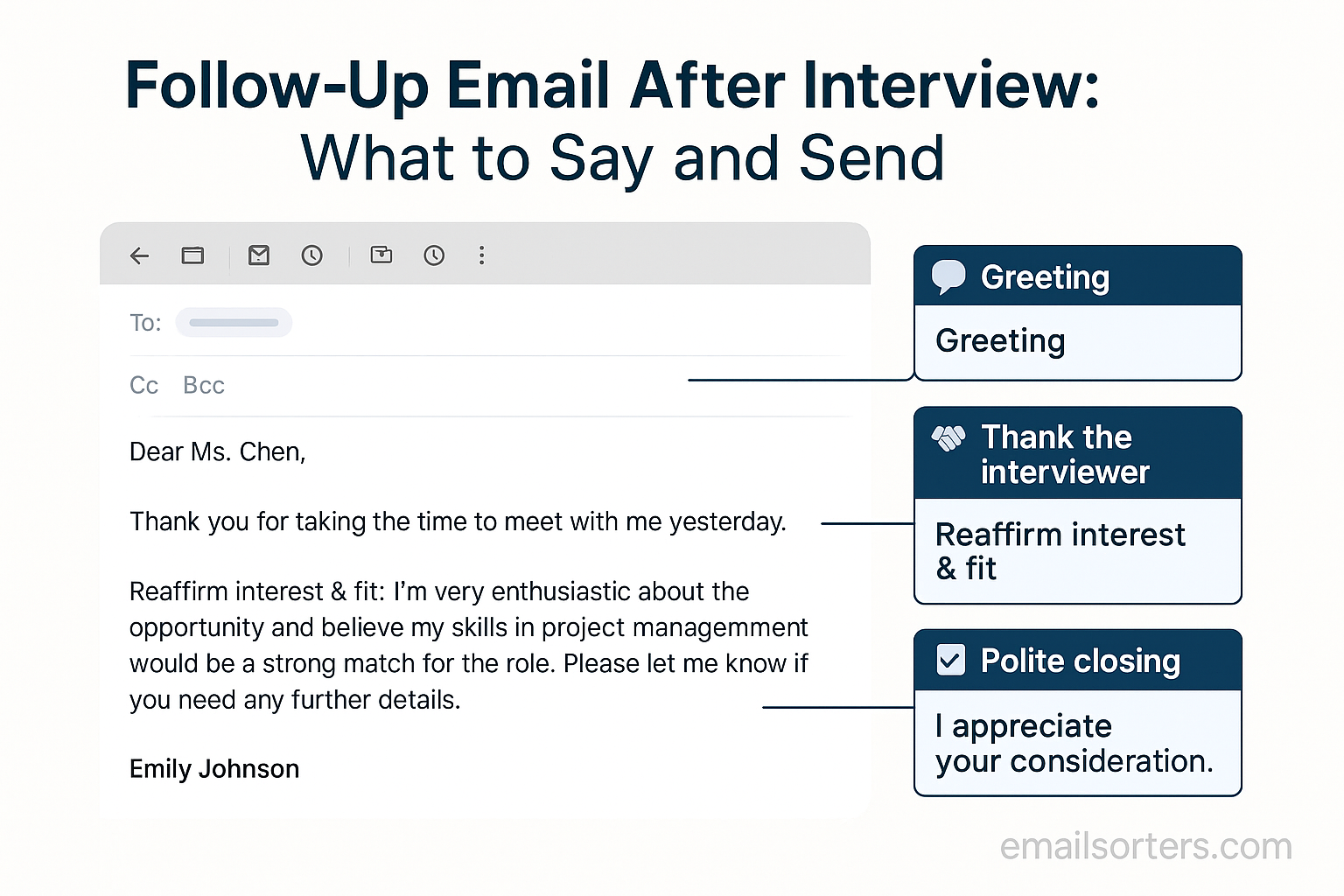
After you’ve had a job interview, your next move can shape what happens next. One of the simplest and most powerful things you can do is send a follow-up email. This message lets the interviewer know you’re still interested. It also gives you a chance to leave a strong final impression. Let’s break down what to say, when to say it, and how to say it in a way that helps your job chances.
Why Sending a Follow-Up Email Matters
Shows Professionalism
Sending a follow-up email makes you look professional. It shows that you respect the interviewer’s time. It also shows you take initiative. Many hiring managers expect a follow-up, especially in competitive fields. If you don’t send one, they might think you’re not serious. A simple thank-you message can set you apart from others who skip this step.
A professional follow-up doesn’t need to be long. Even a few well-written lines can do the job. Mentioning the specific role and date of your interview helps jog the recruiter’s memory. It also shows you are organized. These small signs can make a difference.
Keeps You Top of Mind
After interviews, hiring managers often talk to many candidates. Some days, they may meet five or more people. A follow-up email brings your name back to the top of their mind. It reminds them of your face, your ideas, and what you offer. When your email pops up, they may revisit your resume or notes from the interview.
This step is like placing a gentle reminder. You’re not being pushy. You’re being smart. You’re giving yourself another moment of attention. In jobs with many applicants, this extra moment can help.
Reinforces Your Interest in the Role
Interviewers want to hire people who care about the job. Your follow-up email is a chance to show that. You can write one or two lines about why you liked the conversation. Mention something from the interview that stood out. Maybe the company’s work on a recent project caught your attention. Maybe the team’s culture seemed like a good fit.
Mentioning these things shows you were listening. It proves you’ve thought about the job and how you can help. That kind of interest goes a long way. It can remind the hiring manager why you’d be a good fit.
Best Time to Send a Follow-Up Email
Same Day vs. Next Day
Timing is key. Sending your follow-up email on the same day as your interview can work if your interview was early in the morning. If it was late in the day, wait until the next morning. The best window is within 24 hours. This keeps the interview fresh in everyone’s mind.
Same-day emails show you’re quick and thoughtful. But if you rush it and make mistakes, it can backfire. Take time to write clearly. If you’re unsure, sleep on it and send it the next morning. That gives you time to review your message with a clear head.
Ideal Time of Day to Send It
The best time to send a follow-up email is during business hours. Aim for 9:00 AM to 10:00 AM the day after your interview. This gives the hiring manager time to open it before the day gets busy. Avoid sending emails very early or late at night. Those times may cause your email to be missed.
Emails sent mid-day often get buried. Early morning messages land near the top of the inbox. That gives you a better shot at being seen and read.
When to Send a Second Follow-Up
Sometimes, you don’t hear back after your first email. If you’ve waited for 7 to 10 days with no reply, it’s okay to send a second message. Keep it polite. You’re not demanding answers. You’re just checking in. This second follow-up can show continued interest without coming off as impatient.
Keep your second message shorter than the first. Restate your interest, ask if there’s an update, and say you’re still excited about the role. That’s all you need.
Key Elements to Include in Your Follow-Up Email
Clear Subject Line
Your subject line should say what the email is about. Make it short and simple. Good examples:
- Thank You – [Your Name], Interview on [Date]
- Follow-Up – [Your Name], [Job Title] Interview
This helps the recipient know what the message is about before opening it. Avoid vague subject lines like “Hi” or “Checking In.”
Greeting with Interviewer’s Name
Use the interviewer’s name. It shows you paid attention. If they introduced themselves as “John,” start with “Hi John.” If it was a formal setting, stick with “Dear Mr. Smith.” Use the tone that fits how the interview went.
Personal touches help the email feel natural. Avoid generic greetings like “To Whom It May Concern.” It makes the message feel cold and distant.
Expressing Gratitude
Say thank you for the interview. Be specific. Mention the date and the position. You can write:
“Thank you for taking the time to speak with me yesterday about the [Job Title] role.”
This shows you remember the conversation and value their time. Gratitude creates a good feeling. It makes your message positive and memorable.
Reference to Something Discussed
Mention a topic you talked about. Maybe it was a project, a goal, or something the company is working on. This helps the message feel personal, not like a copy-paste email.
Try something like:
“I enjoyed hearing more about your plans to expand the customer service team and the new support system you’re rolling out.”
This detail proves you listened and are engaged.
Reaffirming Your Interest
Say again that you want the job. Keep it short. One or two lines is enough. Try this:
“I’m even more interested in the position now and believe my background in [Skill/Field] fits well with your goals.”
This leaves the door open for the next steps.
Short Sign-Off with Contact Info
End with a polite sign-off. Examples:
- Best regards,
- Sincerely,
- Thank you,
Include your name and contact info under the sign-off. Keep it simple.
Step-by-Step Sample Follow-Up Email
Template for a First Interview
Here’s a simple structure to follow:
Subject: Thank You – [Your Name], Interview on [Date]
Hi [Interviewer’s Name],
Thank you for speaking with me about the [Job Title] position yesterday. I enjoyed learning about the role and how your team works together. I especially appreciated our discussion about [insert specific topic].
The position sounds like a great fit, and I’m excited about the chance to bring my experience in [Skill/Field] to your team. Please let me know if there’s anything else you need from me.
Thanks again for your time and consideration.
Best regards,
[Your Full Name]
[Your Phone Number]
[Your Email]
Common Mistakes to Avoid
Sounding Desperate
Avoid writing in a way that seems too eager or needy. Saying things like “Please hire me” or “This is my dream job” might seem genuine, but it can make you appear less confident. Employers want someone who is interested in the job, but not desperate for it. Stay calm and professional. Keep your tone polite and confident.
Desperation can also show in phrases like “I haven’t heard back, is everything okay?” or “I’m really hoping for a chance.” Avoid asking if you did something wrong. This adds pressure and might make the reader uncomfortable. Instead, simply restate your interest and move on.
Making It Too Long
Keep your follow-up email short. You’re not rewriting your resume. Don’t summarize the full interview or restate your full background. A good email should be about 150–200 words. Long emails are harder to read and often get skipped.
Focus on key points: thank them, mention something specific, and confirm your interest. That’s enough. Long emails look like essays, and hiring managers don’t have time to read them. Short and sharp is better.
Using Generic Language
Avoid phrases like “great opportunity,” “passionate team,” or “fast-paced environment.” These are overused and don’t say much. Be specific. Mention the team’s recent goals or a topic you talked about in the interview.
Generic language can make your email sound like a template. Personal details show effort. If the interviewer mentioned a challenge they’re working on, refer to it. This makes your message stand out.
Sending Without Proofreading
Always read your email before hitting send. Check for spelling errors, grammar issues, and the correct name and title. One small mistake can hurt your chances. Use tools like Grammarly if needed, but also read the message out loud to catch awkward wording.
Typos and mistakes can make you look careless. Take an extra minute to make sure your message looks clean and polished.
How to Personalize Your Email
Mention a Key Moment from the Interview
Think back to your interview. Was there a moment where you and the interviewer had a real connection? Maybe you laughed about something or agreed on a point. Mention that. It makes the email feel real and personal.
Example:
“I really enjoyed our conversation about your team’s plans to move into new markets. It reminded me of a similar project I worked on last year.”
This shows that you were engaged and that you paid attention. Personal touches like this are more memorable.
Reference Company Projects or Goals
If the company is known for a recent project or change, mention it. For example:
“I’ve been following your launch of the new mobile app. It’s exciting to see how you’re improving user feedback with real-time updates.”
This tells the employer that you did your homework. It also shows that you care about what the company is doing, not just the paycheck.
Align Your Skills with Their Needs
If the interviewer talked about a specific need—like improving sales or growing the design team—connect that to your skills. Example:
“You mentioned that the team is looking for someone to help manage client relations. In my last job, I helped cut customer response times by 30%.”
Now you’re not just saying “I’m interested”—you’re showing why you’re a match. That’s much more powerful.
When You Should Not Send a Follow-Up
If the Company Asked You Not To
Sometimes the recruiter might say, “We’ll contact you if we decide to move forward—no need to follow up.” If you hear that, respect it. Sending a message after being told not to can hurt your chances. It makes it look like you didn’t listen.
If you really feel the need to thank them, you can send a short message that does not ask for updates. Just say thank you and leave it there. No questions, no next steps. Simple appreciation only.
If You’ve Already Sent Multiple Emails
If you’ve already followed up twice and still haven’t heard anything, it’s best to stop. More messages won’t help. They can make you seem pushy or impatient. If you don’t get a reply after 10–14 days and two follow-ups, it’s usually time to move on.
Focus on new applications and keep building your skills. Sometimes silence means the company chose someone else. It happens. Don’t take it personally. Just stay ready for the next opportunity.
What to Do If You Don’t Hear Back
How Long to Wait
The average wait time after an interview is about one week. If the recruiter said they’d respond in three days, give them that space. If there’s no timeline, seven days is a fair wait. After that, it’s okay to send a gentle follow-up.
Hiring takes time. People might be out sick or in other meetings. Don’t rush the process. A short and respectful message after one week is often welcome.
When It’s Okay to Move On
If two weeks pass with no reply—despite your follow-up—it may be time to shift your focus. You can still apply for other jobs while waiting. In fact, you should. Don’t put all your hope in one place.
Even if the company still gets back to you later, you’ll be ready with options. Staying active helps your confidence and increases your chances of landing something.
Following Up Without Being Pushy
When following up again, use a short and calm tone. Don’t sound angry or impatient. Say something like:
“I wanted to follow up and see if there’s any update on the [Job Title] position. I remain interested and would be happy to provide anything else you need.”
This keeps things friendly. You’re asking without pressure. That’s the tone you want.
Using LinkedIn After the Interview
Sending a Connection Request
If you haven’t already, send a connection request to your interviewer. Keep it professional. Write a short note that reminds them who you are. You can say:
“Thanks again for speaking with me yesterday. I enjoyed learning more about your team. I’d be happy to connect here on LinkedIn.”
This helps you stay visible. It’s a small step that can lead to future opportunities—even if this job doesn’t work out.
Writing a Simple Note
If you’re already connected, you can send a message. Don’t use LinkedIn for full follow-ups, but a short thank-you note works. Just one or two lines to say thanks and show interest.
LinkedIn is more casual than email, so don’t overdo it. Just be polite and brief.
Staying in Touch Professionally
Once you’re connected, you might see updates from the interviewer or company. Commenting or liking their posts helps you stay on their radar. Don’t message them too often. Once in a while is fine.
Should You Follow Up by Phone or Email?
Pros and Cons of Calling
Calling can be a fast way to get answers. Some people prefer speaking directly. If you already had a phone-based interview or the recruiter encouraged phone contact, calling might feel natural. A quick call can show confidence.
But there are downsides. You risk catching the hiring manager at a bad time. They may be in meetings or working on other tasks. An unexpected call might feel like an interruption. If you do call, keep it brief. Prepare what to say ahead of time.
A better option is to call only if email has gone unanswered for a long time—two weeks or more—and the job is still open. Otherwise, email remains the better choice.
When Email Is Better
Email gives the reader time to respond when it’s convenient. It also creates a record of your message. This is especially helpful if different people are involved in the hiring process.
Most hiring managers expect email follow-ups. It’s the standard approach. Email also gives you more control over tone and structure. You can review it, revise it, and make sure it says exactly what you want.
Unless told otherwise, always follow up by email first. It’s polite, non-intrusive, and easy to manage.
What to Say If You Call
If you do choose to call, keep your message short and direct. Start with your name, the position you interviewed for, and the date. Then ask if there’s been an update on the hiring process.
Example:
“Hi, this is [Your Name]. I interviewed for the [Job Title] position last Monday. I just wanted to check in and see if there have been any updates. I’m still very interested in the role and would be glad to provide any more information.”
Be polite, thank them, and don’t push for a decision. If they say there’s no update, thank them again and hang up.
Thank You Email vs. Follow-Up Email
Key Differences
A thank you email and a follow-up email are not the same. The thank you email comes right after the interview—usually within a few hours. It shows appreciation and interest. A follow-up email comes later, often when you haven’t heard back after a few days.
The thank you message is about being polite. The follow-up email is about checking for updates or reaffirming interest. Both are helpful, but they serve different purposes.
Timing for Each
The thank you email should be sent within 24 hours. Don’t wait too long. The follow-up email usually comes 5 to 7 days later, if you haven’t heard anything.
Here’s a basic timeline:
- Day 0: Interview
- Day 0 or 1: Send thank you email
- Day 5–7: Send follow-up email (if no response)
Waiting too long between messages can make it seem like you lost interest. But emailing too soon can seem pushy. Stick to this basic timeline for best results.
Should You Send Both?
Yes, if you’re truly interested in the role. The thank you message shows good manners. The follow-up email shows continued interest. Each message has its place in the hiring process.
If you only send one, make it the thank you email. That alone can leave a strong impression. But if things go quiet, your follow-up email can make the difference between getting an offer or being forgotten.
What Hiring Managers Look For in a Follow-Up
Clear Communication
Hiring managers want people who can write clearly. Your follow-up email is a small writing test. If your message is easy to read and error-free, that counts in your favor. Keep your language simple and direct. Avoid long sentences or uncommon words.
A clean and direct message also shows that you respect the reader’s time. Hiring managers are busy. They don’t want to guess what you’re trying to say.
Attention to Detail
Small things matter. Using the correct name, spelling words right, and matching the job title shows that you care. Errors—like calling them the wrong name—can quickly ruin your chances.
Hiring managers often use your email to judge how you’d handle tasks at work. If your message is clean and polished, they may trust you more with future work.
Professional Tone
Your email should sound polite and confident. Avoid slang or overly casual phrases. Use proper greetings and sign-offs. Even if the interview was informal, your message should still sound professional.
Think of it like a short business letter. It should match the tone of the company and your conversation. If they were formal, match that. If they were more relaxed, you can be a bit casual—but not too much.
How to Format Your Email for Readability
Use Short Paragraphs
Big blocks of text are hard to read. Break your email into short paragraphs. Each one should have one idea. For example, one paragraph for saying thank you, one for mentioning a topic you discussed, and one for stating your interest.
Short paragraphs make your message easier to scan. They help the reader stay focused and absorb your key points faster.
Keep It Under 200 Words
Long emails get skipped. Stay under 200 words whenever possible. This keeps your message direct and to the point. You can still say everything that matters within that limit.
Remove extra words. Instead of “I wanted to say thank you for the opportunity to meet with you,” say “Thank you for meeting with me.” Simple and clean works best.
Avoid Overuse of Bold or Italics
Too much formatting can distract the reader. Avoid bolding every other sentence or using all caps. Only use bold or italics if you need to highlight something important—like a job title or date.
In most follow-up emails, plain text works just fine. Focus on your words, not your formatting.
Tools to Help Write a Great Follow-Up
Email Templates
Templates can save time, but don’t just copy-paste. Use them as a starting point. Then add personal details from your interview. Change the name, date, role, and anything specific that was discussed.
A basic structure from a template can help you stay organized. Just make sure it doesn’t sound generic.
Grammar Checkers
Use grammar tools to catch small mistakes. Tools like Grammarly or the built-in checks in your email app can help fix spelling or grammar errors before you hit send.
Still, don’t rely only on software. Read your message out loud. This can help you hear how it flows and find anything that sounds off.
Scheduling Tools
If you’re writing at night, you can use scheduling tools to send your email during office hours. Apps like Gmail let you pick when the message goes out. This makes sure your message lands in the inbox at the right time—usually early morning.
Final Thoughts and Etiquette Tips
Be Polite and Brief
Always keep your tone respectful. A follow-up email isn’t the place to demand answers or express frustration. Use simple language and avoid sounding entitled. Even if you’re excited or anxious, let that stay under the surface. A short and calm message will be taken more seriously.
You want to show that you respect the interviewer’s time and decision-making process. Being too casual or too emotional can backfire. Keep it polite, short, and clear.
Respect Their Timeline
If the interviewer said they’d respond in a week, don’t follow up before that. Give them the time they requested. Rushing them can make you seem impatient. Hiring often involves more than one decision-maker, and delays are common.
If you’re unsure about the timing, waiting five to seven business days is safe. Once you’ve followed up once, wait again before sending another message. Don’t overwhelm their inbox.
Stay Positive and Patient
Even if you don’t get the job, keeping your message positive leaves a good impression. You never know when another role may open. Hiring managers remember people who were polite and easy to communicate with.
Don’t express disappointment or ask why you weren’t picked. Instead, thank them again and say you’d be open to other opportunities. A positive note can keep the door open for the future.
FAQs
Q1: Should I send a follow-up email after every interview?
Yes, sending a follow-up email after any type of interview—phone, video, or in person—is a smart move. It shows you’re engaged and respectful of the process.
Q2: What if I forgot to send a thank-you email right after the interview?
It’s okay to send a late message. Apologize briefly for the delay and still express your appreciation. Better late than never.
Q3: Can I send a follow-up email if the interviewer didn’t give a specific timeline?
Yes. Wait about 5–7 business days before sending a polite message to ask if there are any updates.
Q4: Should I follow up with all interviewers or just one?
If you interviewed with a panel, it’s best to send a thank-you to each person individually. If you only spoke to one person, keep it to them.
Q5: Is it okay to ask for feedback if I didn’t get the job?
Yes, but only after the company has told you their decision. Keep your request short and polite. Some may respond with tips; others may not.


